ReasLingo (ReasLab Agent)
ReasLingo is the foundational core of the ReasLab Agent system. It powers all IDE-based AI conversations seamlessly and provides extensive context configuration parameters to adapt to your specific workflow.
Overview
The ReasLingo interface operates directly from your right sidebar layout within any workspace environment. This multi-purpose AI assistant natively understands workspace directories and active text editor contents without friction.
Core Mechanics
Context Injection (@-mentions)
By dragging an active cursor across text lines in your main editor, you can click "Add to Chat" or simply type @ followed by file names within the prompt interface. The AI constructs an aware representation of project constraints relying on these file indices.
Advanced Parameters
To fine-tune the LLM queries via the system configurations, ReasLingo exposes multiple slider/toggles beneath the chat box:
- Max-Tokens: Restricts the maximum output token length generated by your selected provider. Set this higher for complex code generation, or lower for quick clarifications.
- Reasoning Effort (推理强度): A slider mapping the cognitive density of the model pipeline. High inference settings enable sophisticated tree-of-thought derivations in Lean and advanced theorems, while low parameters accelerate standard autocomplete tasks.
- Agent Roles: Access specialized agent profiles optimized specifically for distinct contexts natively. Examples include direct coding generation versus conceptual paper design logic.
Developing Skills
The ReasLab AI dynamically loads and recognizes structured local /skills/ folder patterns. When provided, the AI applies contextually robust custom reasoning logic towards any command query triggered by the user via Markdown structures.
Queue and steer during a reply
You do not have to wait for a reply to finish. While the AI is working, the input box stays open.
- Queue Message holds the message until the current reply ends. Press
Enteror click the send button. Use it to line up what comes next. - Steer hands the message to the running task right away. Press
Cmd + Enteron macOS, orCtrl + Enteron Windows and Linux. Use it to add a constraint, correct the direction, or narrow the scope.
Shift + Enter inserts a line break. Both options work in the sidebar chat and in Agent mode.
The queue
Queued messages sit directly above the input box, oldest first. Each time a reply ends, the next one is sent automatically.
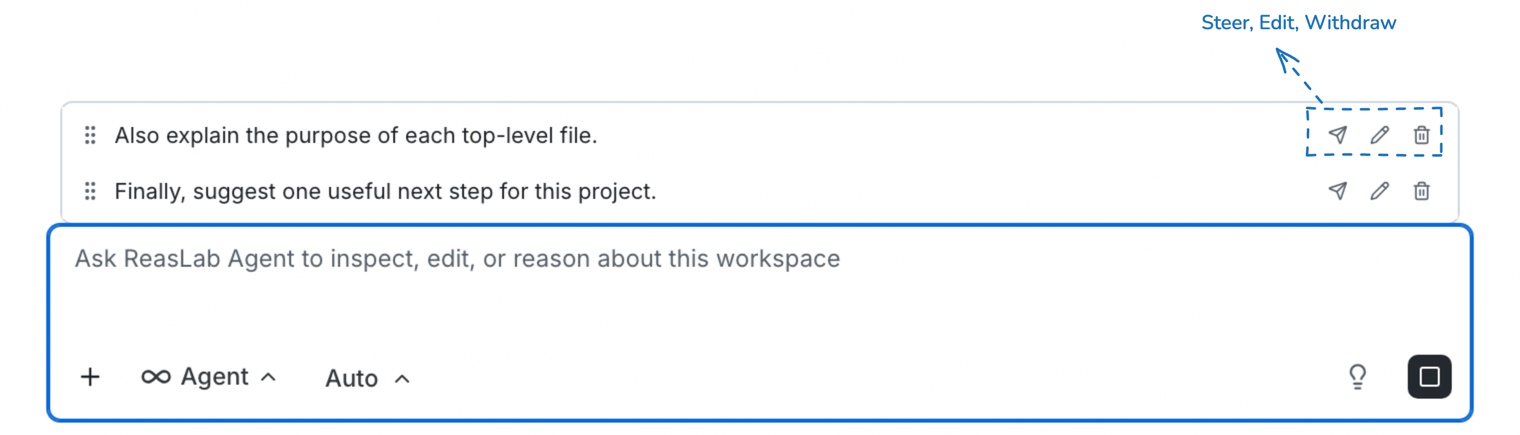
- Drag the handle on the left of a row to change the order.
- The three icons on the right are Steer, Edit, and Withdraw: send that message into the running task, move it back to the input box, or drop it from the queue.
- Edit also restores the files and code snippets that were attached to the message.
- A paper-clip icon marks a row that carries referenced files. Hover it to see them.
While the queue is not empty, Enter adds to the end of it instead of starting a new reply. While a reply is running and the input box is empty, the send button turns into Stop Message, and Cmd/Ctrl + Enter steers the first queued message.
Revisit earlier questions
Two sets of shortcuts work on your own earlier messages. The arrow keys bring a question back into the input box; Option/Alt with an arrow key only scrolls the conversation.
Bring a question back
- Press
↑for your latest question and keep pressing↑for older ones;↓moves back toward newer ones. Past the newest, the draft you had before you started browsing comes back. - In a draft of your own that spans several lines, the arrow keys move the caret first:
↑recalls only from the first line,↓only from the last. A recalled question keeps stepping as long as you have not edited it.
Jump between your messages
Put the focus in the input box or the message list, then hold Option (⌥) on macOS or Alt on Windows and Linux.
↑scrolls to your previous message,↓to the next one.- Older messages load as needed. Past your latest message, the view returns to the bottom of the conversation.
Chat actions
Each message has a short action row. On the latest reply you also get Regenerate.
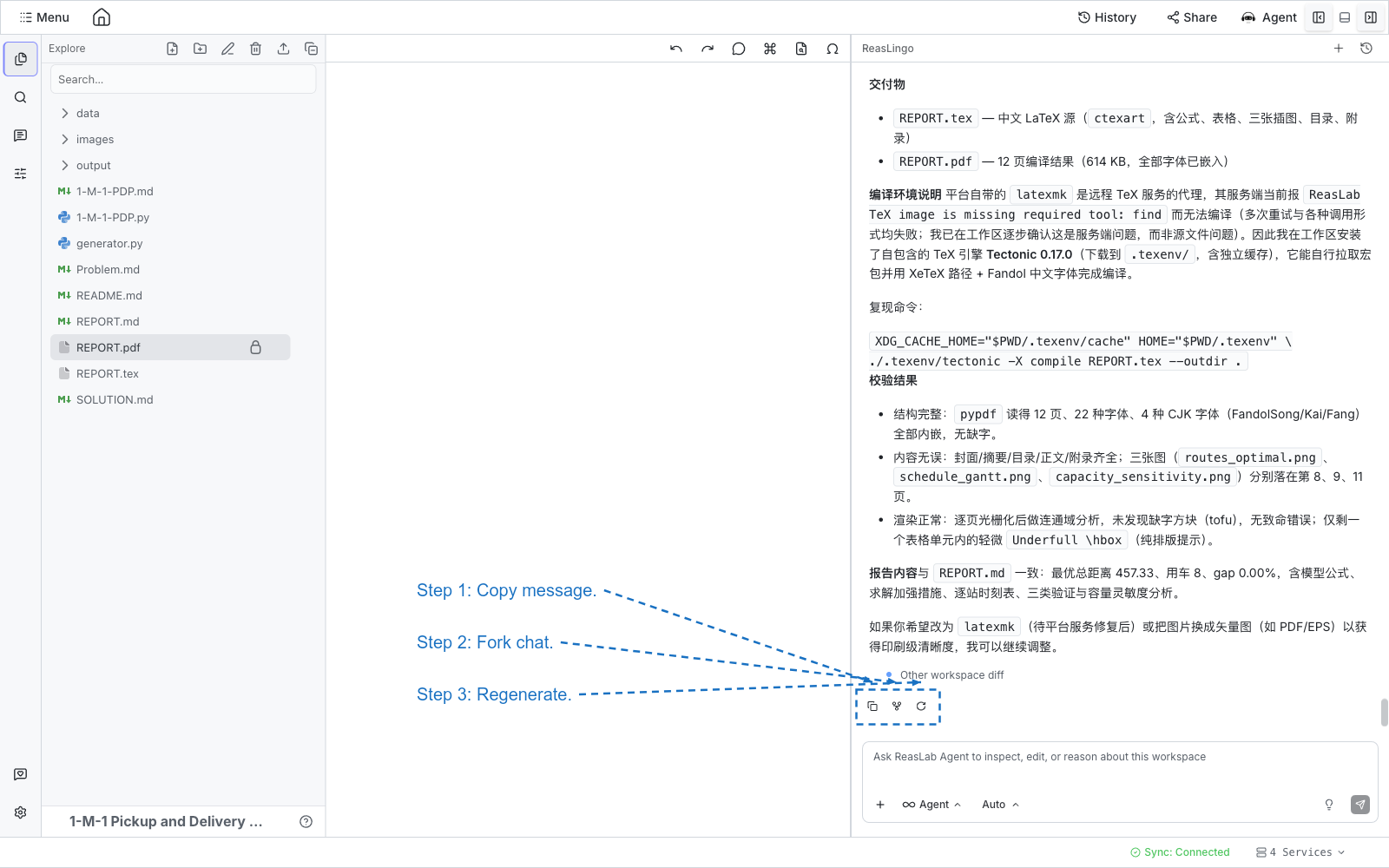
- Copy message copies that turn’s text to the clipboard. The icon switches to a check mark briefly.
- Fork chat starts a new session that keeps the conversation up to and including that message, then opens the new session. The original chat stays as it is. Forked sessions are titled with
(Fork). Wait until the current reply finishes before forking. - Regenerate appears only on the latest message, after the reply has finished. It sends your latest question again and appends a new answer. The earlier reply stays in the thread.
Export a chat
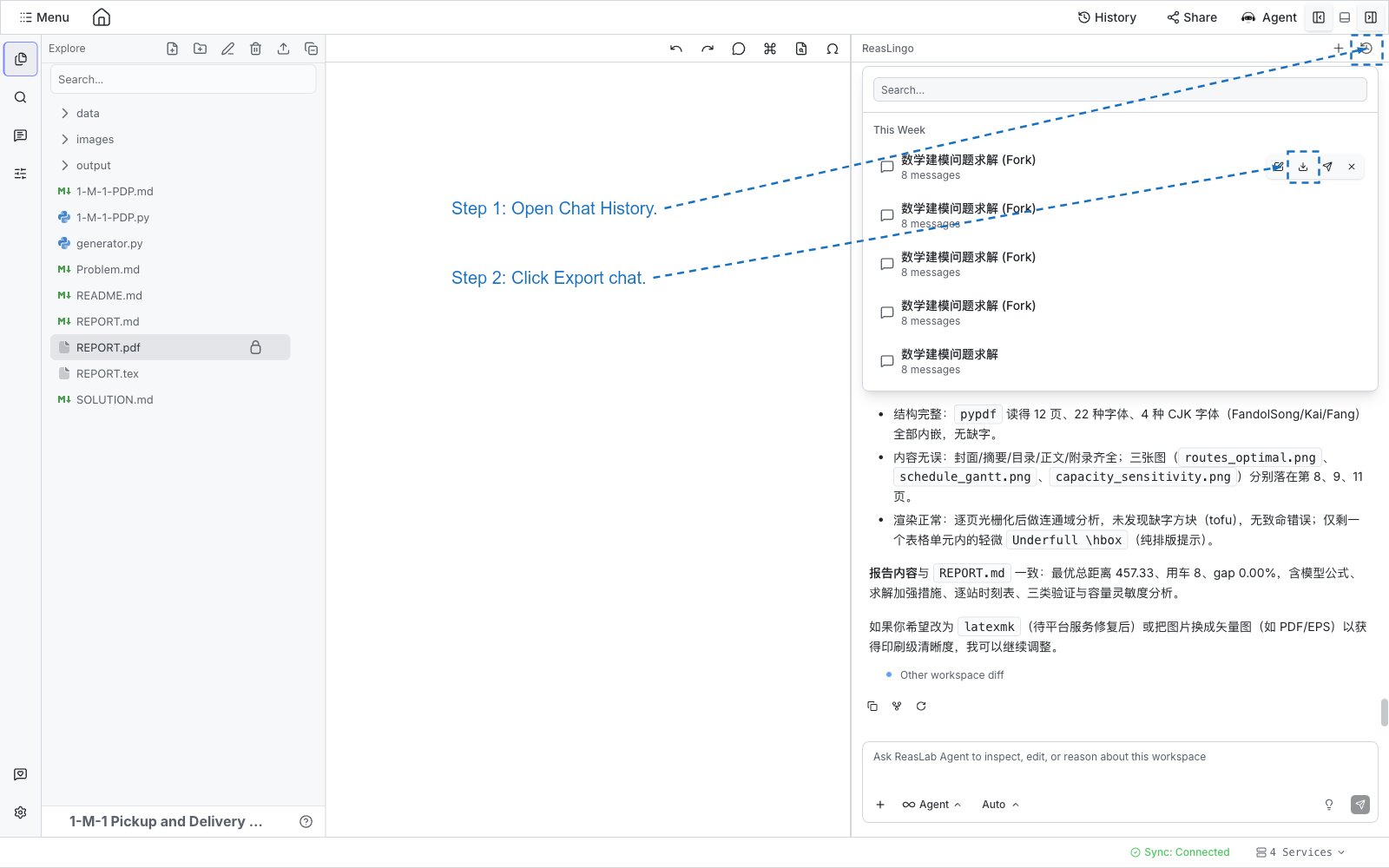
- Click Chat History (the clock icon) in the ReasLingo header.
- Hover a session. The row shows rename, export, send-copy, and delete.
- Click Export chat (the download icon).
ReasLab downloads a Markdown file: the session title, the export time, your messages as quotes, and the assistant’s replies as Markdown.